Purchase invoices load themselves. You just check them off.
Snap a photo and Tildalo reads it, matches it to your catalog and loads it into your system. You review and confirm.
- No more typingPhoto, PDF or the CFE XML, in seconds.
- Nothing goes in without your OKAnything unclear gets flagged for you to review.
- Costs under controlIf a supplier charges you more, it tells you, invoice in hand.
Try it here. It’s the real Tildalo app, running. Tap the blue button and load an invoice.
- Buyer’s RUT is correct
- Totals and VAT add up
- CFE verified with DGI
12 lines read. They still need to be matched to your catalog.
Loaded into Doria
Ferrosur Mayoristae-Invoice A 0045127
- Lines12
- StockUpdated
- Cost increases1 approved
- Approved byYou
- Doria
- Odoo
- Zureo
- SAP Business One
- Excel
- Any system that imports spreadsheets
What your team does by hand today, Tildalo handles on its own.
| The supplier says | You call it |
|---|---|
| SCRW SELF-DRL 8X1 BX100 | Self-drilling screw 8×1"✓ TOR-AUT-8X1 · learned |
| SILIC ACET CLEAR 280ML | Acetoxy silicone 280 ml✓ SIL-ACE-280 · learned |
| LATEX INT WHT 20L | White interior latex 20 L✓ LAT-INT-20 · learned |
$U 1,040 more
- Buyer’s RUTCorrect
- Totals and VAT vs. the XMLAdd up
- !e-Ticket: no VAT creditFlagged
- Supplier active in the CFE systemVerified
- Credit note linked to its invoiceLinked
- !Deadline to accept or reject the CFE6 days left
Your purchases, costs and suppliers on one screen.
Cost increase alerts, purchases by supplier and category, your most purchased products and DGI tax checks. Click any section: it works. If you load an invoice in the demo above, it shows up here.
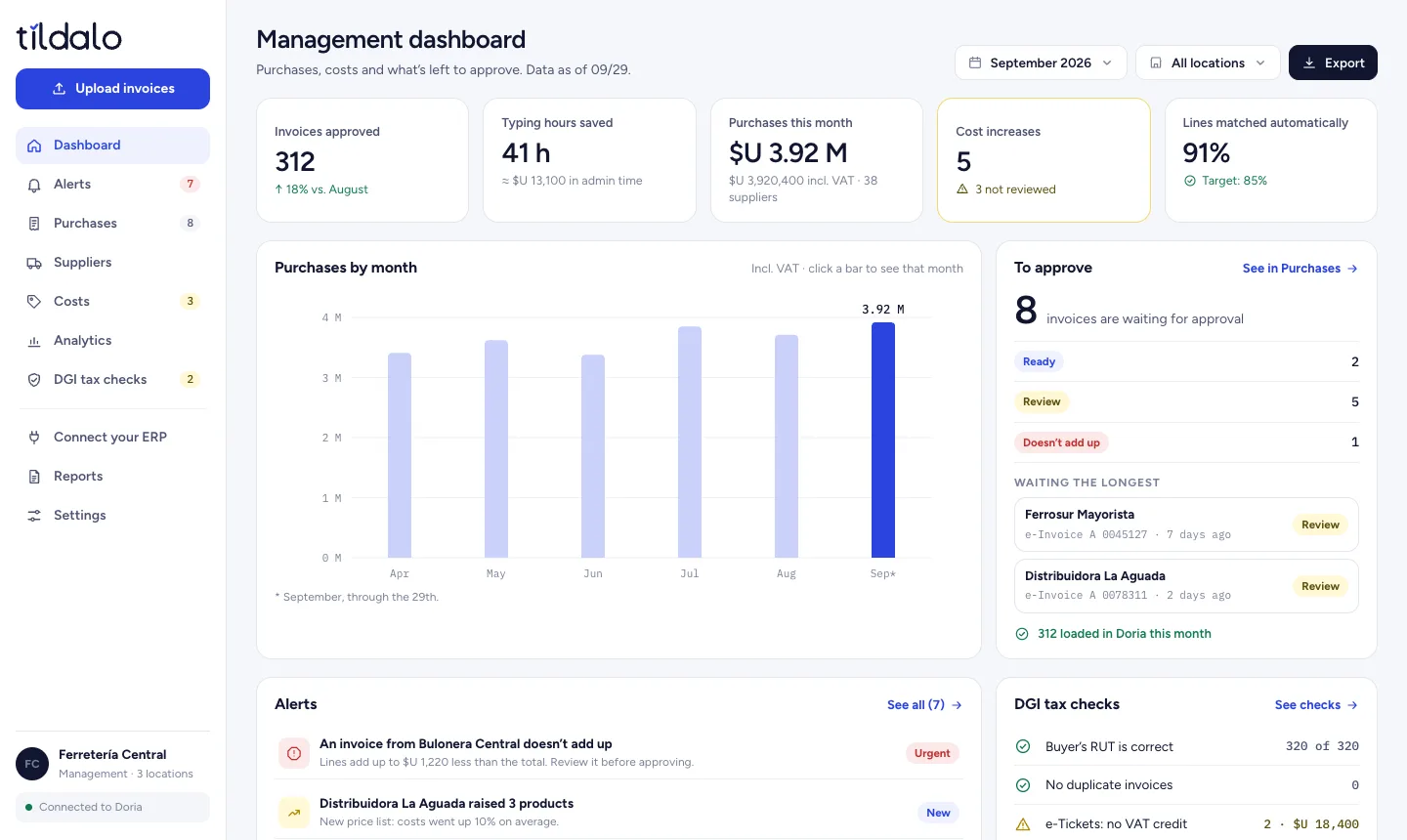
Sample data. Management opens the dashboard on a computer; invoices are loaded from a phone.
Run the numbers for your business.
Retail plan, USD 129 + VAT. Admin time valued at $U 320 per hour, including social security, 13th-month bonus and paid leave, based on Uruguay’s retail wage agreements (Group 10 of the Wage Councils). Exchange rate: $U 40.27.
One monthly price, based on how many invoices you load.
Unlimited users on every plan. Launch pricing in US dollars, plus VAT.
Counter
Up to 150 invoices per month
- Photo, PDF and CFE XML
- Matching to your catalog
- DGI tax validations
- Spreadsheet for your system
Retail
Up to 500 invoices per month
- Everything in Counter
- Direct connection to your system
- Cost increase alerts
- Up to 3 locations
Distribution
Up to 1,500 invoices per month
- Everything in Retail
- Unlimited locations
- Supplier rules and dual approval
- API and priority support
What people ask us before getting started.
Still have a question? Book a demo and we’ll go over it on the call.
What if Tildalo makes a mistake?
Nothing goes into your system without a person reviewing it. Tildalo highlights in yellow anything it isn’t sure about, checks that the totals add up and keeps a history of every load.
Which systems does it work with?
It connects directly to Doria, Odoo, Zureo and SAP Business One. If you use another system or work with spreadsheets, we give you a file ready to import.
What about paper invoices?
Just snap a photo with your phone. When the invoice is electronic and you have the CFE XML, Tildalo uses that file, which is exact.
How long does it take to get up and running?
Setup takes one to three weeks, depending on your system. Your first real invoice is loaded in the first week.
Is my data secure?
Your invoices are encrypted, with per-user access, and are never used to train AI models. We handle data in line with Uruguay’s Personal Data Protection Law No. 18,331.
I’m an accountant. How does it work for me?
Your clients load their invoices with Tildalo and you receive their purchases ready and validated. For every client you refer, you earn 20% of their monthly fee for a year.
See it in action in 30 minutes.
By video call or at your store: we show you how invoices get loaded, run the numbers with your figures and tell you which plan fits.
- You tell us how many invoices you load and which system you use.
- We show you Tildalo live, with invoices like yours.
- We send you a proposal with setup and plan.
Pick a day and time.
Our calendar opened with your details filled in. Pick a time that works for you and you’ll get the confirmation by email.